Posts

Showing posts with the label mobility

Powering Your Gadgets in the Wilderness

Image
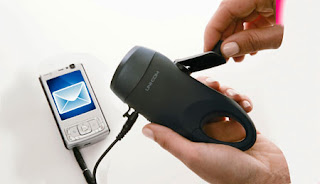
In discussions with other gadgets users, often the problem of getting extra power comes up. Particularly when you are away from power outlets for prolonged time - e.g. on the nature hike. Two "miracle solutions" always inevitably come up - using muscle power ("wind-up chargers") or using solar power. On first look, they appear to be perfect. However, they have very significant shortcomings in reality:

Choosing the Good Wireless Keyboard - Trial of Logitech K360

Image
I've bought the Logitech K360 wireless keyboard in addition to K800 just to try, which one I will like more (K800 was the obvious first choice, because of standard full size layout, palmrest, backlit keys and unifying nano-receiver support). I wanted to also try K360, because it has compact layout that I like coming from laptops (dispenses with right-side key duplication), and also it looked much like my laptop chiclet keyboard (that I liked). However, on actually trying the K360 out I've found it to be worse in feel:

Is Thinkpad W701 MXM? Kind of. Upgradeable? Nope :(

Image
When I've chosen Thinkpad W701 as a laptop, one of the potential pluses I've considered is the usage of MXM 3.0 Type B slot for video card. Because MXM is a standard like PCIe, it would have potentially enabled upgrading to more powerful third-party graphics card. The Quadro 2800M is still quite respectable, but recent-gen like AMD 6970M already does better. Of course I did realise this was a  potential , not guarantee , but it still worth to try. In my previous blog post I've described details of mechanical tinkering, you can read it here - Thinkpad W701–anatomy of MXM video module Since I've established that mechanically and electrically almost any MXM card would be accepted, all that remained is to try the actual card(s) - I was prepared to try several different ones starting from most powerful in case it would not work.

Choosing an excellent Headset/Headphones

Now that I finally have standard 3.5 mm TRS jack on my new and shiny Motorola Milestone , I can finally upgrade to high quality headset without resorting to additional cables/cumbersome adapters. I go with in-ear headphones. Supra aural ones are not really that accurate and hard to wear in all settings (i.e. on the street). Ear buds are generally bad, because they don’t isolate at all. Currently I am comparing two headsets: Ultimate Ears SuperFi 5vi Etymotic Research hf2 Doing extensive listening tests on both. Up to now, wavy opinion – Ultimate Ears have more perceivable bass, but sound more “mushy”. While Etymotics are crystal clear, you can hear so much detail of music its overwhelming, but they may seem to sound a bit “dry” and bass-less because of high accuracy. Guess will play with both for a while to see if opinion stabilizes ;)

Enabling Additional Features on Synaptics Touchpad

I think majority of modern laptops use Synaptic touchpad in them. These are capacitive input panels, so naturally they can detect multiple finger presses at once. Recent Synaptics drivers have a lot of multi-touch gesture functionality in them. However, you will find most of it disabled on many notebooks – I think for marketing reasons (or maybe to avoid aggravating Apple too much ;) ). However, all multi-touch functionality is present on standard driver, and just artificially “hidden” using registry keys (which are even named like “HideTwoFingerScrolling”, how honest of them ;) ). So, to re-enable missing features just: Download this .reg file , save it somewhere – on your desktop for example. Do not choose “Open” in browser, choose “Save To…”! Click on it to open in Explorer ( important! open from Windows Explorer/Desktop only, not directly from your web browser, not from third-party file managers like Total Commander – to make sure it will use correct registry on 64...